Skej booking links aren't just shareable URLs — you can also embed them directly on your website so visitors can book time with you without ever leaving the page.
This is perfect for:
- Contact pages
- Sales or demo pages
- Support or onboarding flows
- Founder / team booking sections
What Is an Embeddable Booking Link?
An embeddable booking link lets you place your Skej booking experience directly inside your site using an iframe. The iframe securely loads your booking link inside your page, so visitors can schedule time without being redirected elsewhere.
Using an iframe keeps the booking flow isolated, fast, and compatible with most modern websites and builders.
How to Get the Embed Code
- Go to your links.
- Select the booking link you'd like to embed (either one of your primary emails or an additional link).
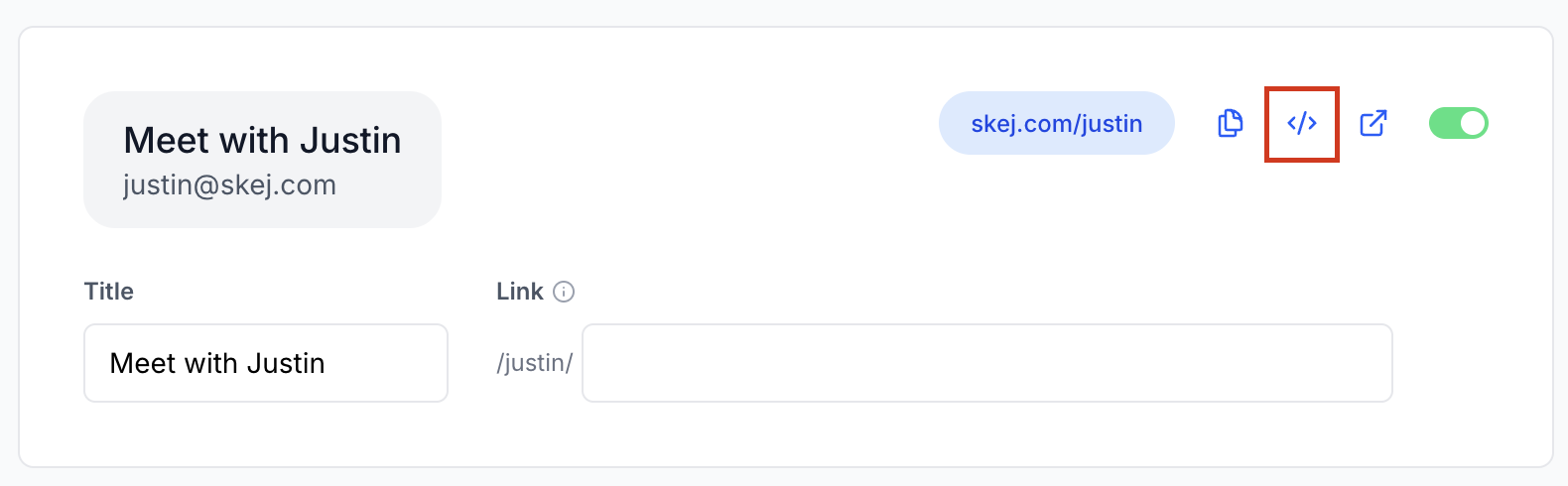
- Click the Embed button </> (as shown below) which will automatically copy the generated code snippet.
That's it — no custom development required.
Embed Options
Skej gives you flexible ways to embed your booking link depending on how you want it to appear.
1. Button Embed (Most Common)
This option generates a button you can place anywhere on your site.
- Clicking the button opens the booking flow
- Works great for CTAs like “Book a Demo” or “Schedule Time”
- Clean and minimal
Example use cases:
- Homepage CTA
- Contact page
- Pricing page
2. Inline Embed
This option embeds the full booking experience directly into the page.
- No pop-ups or redirects
- Visitors can book immediately while scrolling
Example use cases:
- Dedicated scheduling pages
- Support or onboarding pages
How to Add the Code to Your Site
Skej provides a ready-to-use iframe code snippet.
To embed it, paste the snippet into your website where you want the booking experience to appear. Common places include:
- HTML files
- Website builders (Webflow, Squarespace, Wix, etc.) using an Embed / Custom Code block
- CMS platforms like WordPress (Custom HTML block)
Tip: Because Skej uses an iframe, no additional JavaScript setup is required.
What Happens After Someone Books?
When someone books through an embedded iframe:
- The scheduling flow runs securely inside the iframe
- Skej handles availability, scheduling, and confirmations
- The meeting is automatically added to your calendar and you will receive a confirmation
- All your existing Skej rules, buffers, and preferences apply
Embedding a booking link via iframe does not change booking behavior — it simply embeds the same experience directly on your site.
Best Practices
- Use clear CTA text (e.g. Book a Demo, Schedule Time with Our Team)
- Place embeds near high-intent content
- Avoid embedding multiple booking links on the same page
- Test the embed on desktop and mobile
Need Help?
If you're unsure which embed option to use or run into issues adding the code, reach out to the Skej team at skej@skej.com — we're happy to help you get it set up.